


Most UK business owners only look at their website when something breaks. That habit is expensive. A website audit checklist for UK businesses needs to run on a schedule, not a crisis, because the definition of a “good” website changed a great deal in 2026. Google now shows AI-generated summaries on a large share of tracked searches, and organic click-through rates fall sharply wherever one appears. If your site isn’t built to earn a citation, load fast, work for disabled users, and hold up under UK data law, you’re losing ground before a visitor even reaches the page. We run full-site audits as part of our SEO services in London, and this checklist covers the ten checks that decide whether a UK business site converts or quietly bleeds traffic. None of it needs a huge budget. It needs an hour, the right tools, and a clear order to work through them in.
What a Website Audit Actually Checks (and Why 2026 Changed the Rules)
A website audit is a structured review of a site’s technical health, content, and compliance position, measured against current search and legal standards. It isn’t a single tool report. PageSpeed Insights tells you about speed; it says nothing about whether your cookie banner meets PECR, or whether a screen reader can complete your checkout form.
Three shifts make a 2026 audit different from one run a few years ago. Search results now blend AI-written summaries with the traditional blue links, industry tracking shows organic click-through rates dropping by roughly 34% to 46% wherever an AI Overview appears (Search Engine Journal). UK accessibility enforcement has moved from a theoretical risk to active demand letters. And mobile phones now generate the majority of UK web traffic, so a site that still behaves like a shrunk-down desktop page is turning visitors away before they read a word. None of these three shifts replaces the others — a site can pass every SEO check and still fail on compliance, and a beautifully accessible site can still be invisible to an AI answer engine. A proper audit has to hold all three at once.
How Often Should a UK Business Audit Its Website?
Run a quick technical check every quarter — broken links, page speed, and Search Console errors take an afternoon. Run the full ten-point audit at least once a year, or immediately after a redesign, a platform migration, or a Google core update that moves your rankings. Algorithm updates in 2026 have reshuffled large portions of the search results for competitive queries, which is exactly the kind of event that should trigger an off-cycle review rather than waiting for the annual one.
The 10-Point Website Audit Checklist
Work through these in order. Each one builds on the last: a fast site with broken accessibility still loses customers, and a fully compliant site with no local SEO still won’t get found in the first place.

1. Page Speed and Core Web Vitals
Google measures three field metrics at the 75th percentile of real visits: Largest Contentful Paint (LCP) at 2.5 seconds or under, Interaction to Next Paint (INP) at 200 milliseconds or under, and Cumulative Layout Shift (CLS) at 0.1 or under (web.dev, Google). These come from real Chrome users on real connections, not lab estimates. Pull the report from Search Console’s Core Web Vitals panel, since that reflects actual visitor data rather than a single test run. A slow LCP is usually a hero image or web font blocking the page; a poor INP is usually a heavy third-party script firing on click.
2. Mobile Usability
Mobile phones account for roughly 57–58% of UK web page views (Statista), and Google indexes your mobile version first, not your desktop one. Load the site on an actual phone, not a resized browser window. Check that tap targets aren’t cramped, forms don’t force pinch-zooming, and navigation menus collapse cleanly. If a checkout or enquiry form was designed desktop-first, this is usually where abandonment starts — mobile shoppers convert at roughly half the rate of desktop shoppers in current UK benchmarks.
3. Technical SEO Foundations
Crawlability problems are common enough to matter: one widely cited 2025 analysis found that roughly two-thirds of audited websites carried critical crawl or indexation issues that blocked pages from ranking at all (WhiteHat SEO). Check that your XML sitemap lists only live URLs, that robots.txt isn’t accidentally blocking key pages, and that redirect chains are flattened to a single hop. Confirm every page carries one H1, a unique title tag, and a distinct meta description — small details, but they’re the first signals a crawler parses. Run a free crawl with Screaming Frog or Search Console’s own coverage report before you touch anything else on this list; fixing a blocked page is pointless if the rest of the audit sits on top of a site Google can’t reach in the first place.
4. AI Search Readiness: AEO and GEO
AI Overviews and Google’s AI Mode now touch a large share of everyday search queries, and being cited inside an AI answer is becoming as valuable as ranking first used to be. Structure content so the opening two or three sentences of each section answer the question directly — that’s the passage AI systems tend to lift into a summary. Add FAQ schema, name entities explicitly instead of relying on vague pronouns, and confirm AI crawlers can actually reach your pages. We cover the mechanics in more depth in our guide to what Generative Engine Optimisation means for UK businesses.
5. Accessibility and the Equality Act 2010
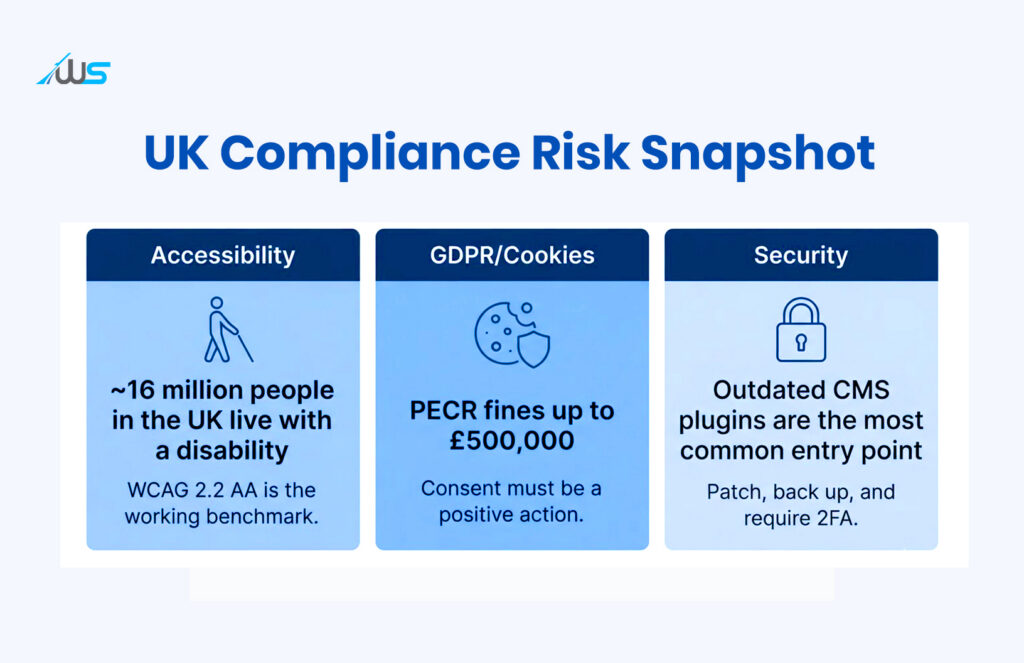
UK service providers, including website owners, have a duty to make reasonable adjustments for disabled users under Section 20 of the Equality Act 2010. The Act doesn’t name a single technical standard, but WCAG 2.2 Level AA is the benchmark courts and regulators reach for in practice. It matters more than most business owners assume — around 16 million people in the UK live with a disability, and a 2026 review of one million homepages found the average WordPress site carried over 50 detectable accessibility errors (WebYes, citing the WebAIM Million report). Run an automated scan, then test keyboard-only navigation and a screen reader on your contact or checkout form by hand — automated tools miss most of what actually blocks a real user.
6. GDPR and Cookie Consent (PECR)
UK cookie rules sit under the Privacy and Electronic Communications Regulations, which the ICO’s cookie guidance sets out in detail. Consent has to be a clear, positive action — no pre-ticked boxes, and continuing to browse the site does not count. Confirm that no non-essential cookies fire before a visitor consents, that rejecting is exactly as easy as accepting, and that your privacy notice names any third party reading that data. PECR fines run up to £500,000 on their own, and a linked GDPR breach can add considerably more on top.
7. Website Security and HTTPS
Every page should load over HTTPS with a valid, unexpired certificate — mixed-content warnings and expired certificates both erode trust and can suppress rankings. Check for outdated CMS plugins and themes, since these remain the most common way small business sites get compromised. Confirm you’re taking regular off-site backups and that any admin login requires two-factor authentication, particularly once more than one person can publish to the site.
8. Content Quality, Freshness, and E-E-A-T
Audit for thin pages, duplicate content, and posts nobody has touched in years — search engines increasingly weight demonstrated experience alongside plain expertise. Update statistics, credit real named authors, and merge or redirect pages that are competing for the same keyword instead of leaving them to cannibalise each other’s rankings. A quick way to spot decay: sort your analytics by organic sessions over the last 12 months and flag any page that has dropped by a third or more — that’s usually either outdated content or a page a competitor has recently outranked.
9. Conversion Paths and User Experience
A technically flawless site that confuses visitors still fails commercially. Trace your own path from the homepage to an enquiry form or checkout and count the clicks. Check that calls-to-action are visible without scrolling, that forms ask for the minimum information needed, and that error messages explain what actually went wrong. This is where design decisions meet revenue directly, and it’s where our UI/UX design team in London spends most of its audit time.
10. Local SEO and Google Business Profile
If you serve customers in a specific UK city or region, claim and verify your Google Business Profile, keep opening hours current, and make sure your business name, address, and phone number match exactly across your website, citations, and directories such as Yell or Thomson Local. Inconsistent NAP data is one of the most common reasons local businesses lose visibility in the local map pack.
Website Audit Checklist at a Glance
Use this table as a working scorecard. Tick off each row as you complete it, and tackle the “High” priority rows first if you’re short on time.
| # | Check | What “Good” Looks Like | Priority |
| 1 | Page speed (Core Web Vitals) | LCP ≤ 2.5s, INP ≤ 200ms, CLS ≤ 0.1 | High |
| 2 | Mobile usability | Fully usable one-handed, no pinch-zoom, no overlap | High |
| 3 | Technical SEO foundations | Clean sitemap, no crawl blocks, unique titles/H1s | High |
| 4 | AI search readiness (AEO/GEO) | FAQ schema, answer-first sections, crawlable content | Medium |
| 5 | Accessibility (Equality Act 2010) | WCAG 2.2 AA, tested with keyboard + screen reader | High |
| 6 | GDPR / cookie consent (PECR) | Positive-action consent banner, no pre-ticked boxes | High |
| 7 | Security and HTTPS | Valid SSL, patched CMS, 2FA on admin logins | High |
| 8 | Content quality and freshness | No thin/duplicate pages, stats updated within a year | Medium |
| 9 | Conversion paths and UX | Visible CTAs, short forms, clear error messages | Medium |
| 10 | Local SEO and Google Business Profile | Verified profile, consistent NAP everywhere | Medium–High |
DIY Website Audit vs a Professional Website Audit
A business owner with a free afternoon and free tools — Search Console, PageSpeed Insights, a free accessibility scanner — can work through this checklist and fix the obvious issues. Where it gets harder is the interdependent problems: a CLS issue caused by how web fonts load, an INP delay buried inside a third-party script, or an accessibility fix that needs a genuine code change rather than a plugin toggle. That’s usually where a specialist web development team earns its fee, because the fix touches the codebase itself, not just a settings panel.
There’s also a time-cost most business owners underestimate. A thorough DIY audit across all ten points, done properly rather than skimmed, realistically takes a full working day the first time through. An agency with the right tooling can usually compress that into a few hours, then hand over a written, prioritised list rather than a folder of screenshots. Neither approach is wrong — it depends on whether your time is better spent auditing the site or running the business behind it.
If your last audit was more than twelve months ago, or you’ve never run one, start with the High-priority rows in the table above, fix those first, then work down the list.
Turn This Checklist Into a Habit, Not a One-Off
A website audit isn’t a one-off project. It’s maintenance, the same as servicing a van or checking payroll. Run through this checklist at least once a year, and again after any redesign, migration, or major Google update. If you’d rather have a specialist run the full ten-point review and hand you a prioritised fix list, get in touch with Webskitters for a website audit built around your site, not a generic template.
Frequently Asked Questions
What is a website audit checklist?
A website audit checklist is a structured list of technical, content, and compliance checks — speed, mobile usability, SEO, accessibility, GDPR, security, and conversion — used to assess and improve how a website performs for both users and search engines.
How much does a website audit cost in the UK?
Costs vary with depth and site size. A basic automated audit can be run for free using tools like Google Search Console and PageSpeed Insights. A professional agency-led audit for a UK small business site typically starts from a few hundred pounds for a focused technical review and rises for a full ten-point audit with a prioritised action plan.
How often should I audit my website?
Run quick technical checks quarterly and a full audit at least once a year, or immediately after a redesign, a platform migration, or a major Google core update.
Is my website legally required to be accessible in the UK?
Yes. The Equality Act 2010 requires UK service providers, including website owners, to make reasonable adjustments for disabled users. WCAG 2.2 Level AA is the practical benchmark used by courts and regulators, even though the Act itself doesn’t name a specific technical standard.
What is the difference between an SEO audit and a website audit?
An SEO audit focuses narrowly on search visibility — keywords, backlinks, and rankings. A website audit is broader: it covers SEO alongside performance, accessibility, GDPR compliance, security, and conversion, because all of these affect whether a visitor becomes a customer.
Can I do a website audit myself?
Yes, for the basics. Free tools such as Google Search Console, PageSpeed Insights, and a free accessibility scanner cover the first layer of checks. Deeper issues — like a script causing a poor INP score or an accessibility fix that needs a genuine code change — usually need a developer.
