


Passwords have run their course. Every year, more sites drop them for a faster, safer sign-in method called a passkey. If you manage a business website, this shift affects your customer logins, your checkout flow, and your exposure to credential theft.
This guide explains what passkeys are, why passwords keep failing, and what adding passkey support actually means for your website’s security. It’s written for site owners and marketing teams, not just developers.
What Are Passkeys, Exactly?
A passkey is a digital credential that replaces a username and password with a cryptographic key pair. It’s built on the WebAuthn standard, an open specification maintained by the W3C and the FIDO Alliance.
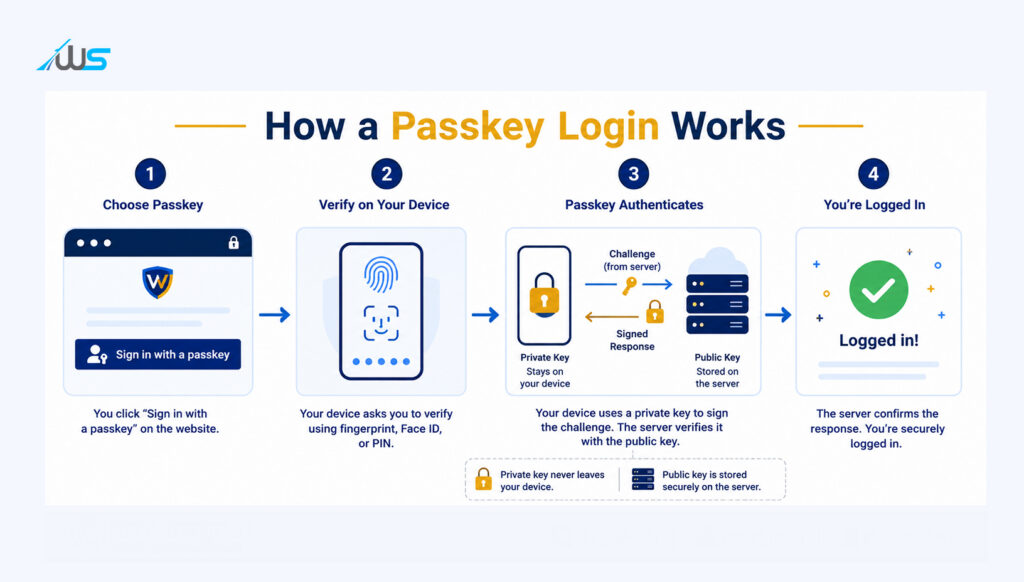
Instead of typing a password, a user unlocks their device with a fingerprint, face scan, or PIN. That unlock signs a cryptographic challenge sent by the website. No password is created, typed, stored, or transmitted at any point.
Two keys make this work:
- A private key that never leaves the user’s device or password manager.
- A public key that your website stores, used only to verify sign-ins.
Because the private key never travels over the network, there is nothing for an attacker to steal from a phishing page or a leaked database. This single design choice removes the two most common ways passwords get compromised.
Passwords have run their course. Every year, more sites drop them for a faster, safer sign-in method called a passkey. If you manage a business website, this shift affects your customer logins, your checkout flow, and your exposure to credential theft.
This guide explains what passkeys are, why passwords keep failing, and what adding passkey support actually means for your website’s security. It’s written for site owners and marketing teams, not just developers.
What Are Passkeys, Exactly?
A passkey is a digital credential that replaces a username and password with a cryptographic key pair. It’s built on the WebAuthn standard, an open specification maintained by the W3C and the FIDO Alliance.
Instead of typing a password, a user unlocks their device with a fingerprint, face scan, or PIN. That unlock signs a cryptographic challenge sent by the website. No password is created, typed, stored, or transmitted at any point.
Two keys make this work:
• A private key that never leaves the user’s device or password manager.
• A public key that your website stores, used only to verify sign-ins.
Because the private key never travels over the network, there is nothing for an attacker to steal from a phishing page or a leaked database. This single design choice removes the two most common ways passwords get compromised.
Why Passwords Are Failing Your Website
Passwords fail because people reuse them and attackers automate the guessing. The 2025 Verizon Data Breach Investigations Report, which analysed over 22,000 security incidents, found that stolen or compromised credentials were involved in a large share of breaches. The numbers below show the scale of the problem.
| Metric | Figure | Source |
| Breaches starting with stolen credentials | 22% | Verizon DBIR 2025 |
| Basic web application attacks involving stolen credentials | 88% | Verizon DBIR 2025 |
| Breaches involving human error or manipulation | 60% | Verizon DBIR 2025 |
| Distinct passwords per user (median), across services | 49% | Verizon DBIR 2025 |
These figures point to one root cause: a password is a shared secret that a user has to remember, type, and reuse. Every point in that chain is an opportunity for theft. A passkey removes the chain entirely.
How Passkeys Work on a Website
From a visitor’s side, signing in with a passkey takes three steps:
- They tap “Sign in with a passkey” instead of entering a username and password.
- Their device asks for a fingerprint, face scan, or screen-lock PIN.
- The device signs a one-time challenge from your server and the visitor is logged in.
On the server side, your site never receives anything secret. It stores a public key against the account and checks a signature on every login attempt. Even if your database is breached, the public keys inside it are useless to an attacker without the matching private keys on users’ devices.
Passkeys vs Passwords: A Side-by-Side Comparison
| Factor | Passwords | Passkeys |
| Phishing resistance | Low — can be typed into a fake site | High — tied to the real site’s domain |
| Credential reuse risk | High — same password often reused | None — a unique key pair per account |
| What a breached database exposes | Password hashes attackers can crack | Public keys only, not usable alone |
| Login speed | Typing plus possible MFA step | One tap or biometric scan |
| Recovery method | Email or SMS reset links | Synced across devices via account |
Passkey Adoption Is Already Mainstream
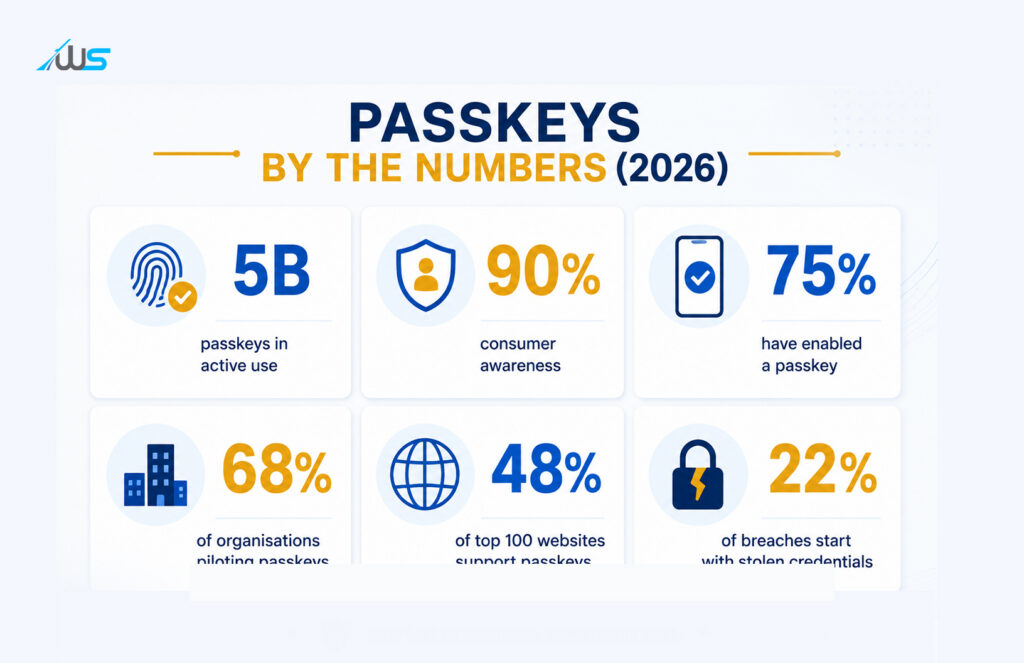
This isn’t a future trend. The FIDO Alliance’s State of Passkeys 2026 report, based on research across 11,000 consumers and 1,400 enterprise decision-makers in ten countries, shows passkeys have moved from novelty to default in under four years.
| Indicator | 2026 figure |
| Passkeys in active use worldwide | 5 billion |
| Consumer awareness of passkeys | 90% |
| People who have enabled a passkey on at least one account | 75% |
| People who use passkeys regularly when offered | 49% |
| Organisations deploying or piloting passkeys for staff sign-in | 68% |
| Top 100 websites offering passkey sign-in | 48% |
Platform defaults are driving much of this. Google made passkeys the default sign-in option for personal accounts in October 2023, and Microsoft followed in May 2025 — a change that Descope reports led to a 120% jump in passkey use across Microsoft accounts. When passkeys are the path of least resistance, people use them.
What This Means for Your Website’s Security
Adding passkeys to your login flow changes your risk profile in three concrete ways.
1. Phishing pages stop working
A passkey is bound to your site’s exact domain. A visitor tricked onto a lookalike site simply can’t complete a sign-in there, because the copied page has no matching private key to call on.
2. A database leak becomes far less damaging
If your user table is exposed, attackers get public keys, not passwords. Public keys can’t be used to log in anywhere else, which removes the credential-stuffing risk that follows most password breaches.
3. Support costs drop
Password resets are one of the most common support tickets on any site with accounts. Passkeys, synced through a user’s device or password manager, need far less manual recovery handling.
None of this replaces a wider security programme. Passkeys handle authentication; you’ll still need secure hosting, patched software, and a well-built ecommerce or web platform behind them. But removing passwords closes the single largest entry point attackers use today.
How to Add Passkey Support to Your Website
- Confirm your login system supports WebAuthn, either natively or through your identity provider (Auth0, Okta, Firebase Auth, and most major providers already support it).
- Offer passkeys as an additional sign-in option first — don’t remove passwords immediately, since some visitors will be on older browsers or devices.
- Let users register a passkey from their account settings page, not just at sign-up, so existing customers can opt in.
- Test across major browsers and both desktop and mobile, since biometric prompts differ by device.
- Monitor sign-in success rates after launch; passkey logins typically complete faster and with fewer failed attempts than password logins.
If your current site runs on an older CMS or a custom login system, this is usually a scoped development project rather than a full rebuild. Our web development team can review your existing authentication setup and scope what’s needed to add passkey sign-in without disrupting current users.
Challenges to Plan For
- Older devices and browsers: a small share of visitors won’t have passkey-capable hardware yet, so a fallback sign-in method is still needed.
- Account recovery: losing access to every synced device is rare but needs a documented recovery path.
- User education: some visitors will see “passkey” for the first time on your site, so a short explainer at sign-up reduces drop-off.
These are implementation details, not reasons to wait. With 48% of the top 100 websites already offering passkeys, visitors increasingly expect the option, not just tolerate it.
Frequently Asked Questions
Are passkeys actually safer than passwords?
Yes. Passkeys use public key cryptography instead of a shared secret, so there’s no password to phish, guess, or reuse across sites. The private key never leaves the user’s device.
Can a passkey be stolen or hacked?
Not remotely. A passkey’s private key is stored on-device and protected by biometrics or a screen lock. An attacker would need physical access to an unlocked device, not just a database or a phishing email.
Do passkeys work across a user’s phone, laptop, and tablet?
Yes, through platform syncing. Passkeys created on one device sync across a user’s other devices via their Apple, Google, or Microsoft account, or through a supported password manager.
Is adding passkey login expensive to implement?
Cost depends on your current login system. Sites using a modern identity provider can often enable passkeys with configuration changes. Custom-built authentication systems need more development work to add WebAuthn support.
Will passwords disappear completely?
Not immediately. Most sites are running passkeys alongside passwords as an option, not a replacement. Full removal will happen gradually as adoption climbs and fallback needs shrink.
Do passkeys help with SEO or site performance?
Not directly, but faster, friction-free logins reduce checkout and account-page abandonment, which supports the engagement signals and conversion rates that indirectly matter for site performance.
Bringing Passkeys to Your Website
Passwords were never designed for how the web is used today. Passkeys close the gap: no shared secret to steal, no phishing page that works, and a faster sign-in for every visitor. With adoption already mainstream, the question for most sites isn’t whether to add passkeys, but how soon.
If you want a clear plan for adding passkey sign-in to your site without breaking existing logins, get in touch with Webskitters for a review of your current authentication setup.
